Count This・Counting Things App
- 3.9
- Rating
- 500.00K
- Installs
- Free
- Price

 Analysis by App-foxy
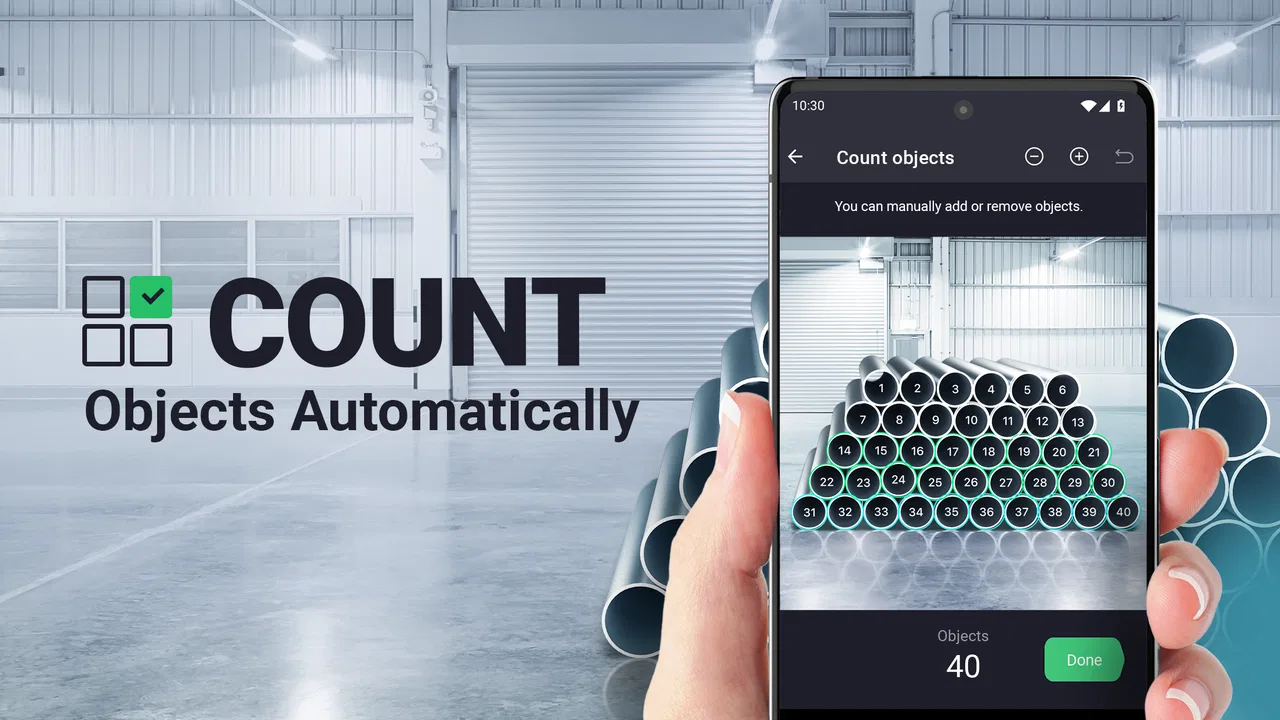
Counting a pile of objects by hand sounds easy until the pile is large, messy, or spread across several boxes. Count This takes a more practical approach: it lets me use a photo to count visible objects such as pills, coins, pipes, boxes, rods, and pieces of lumber. I found the idea most useful when I needed a quick estimate rather than a slow manual tally, especially in situations where touching or moving every item would be inconvenient.
This is a business-focused app from AIBY Inc., but its usefulness is not limited to an office. It can fit stock checks, workshop tasks, household organization, small inventory jobs, and any moment when a camera is easier than a spreadsheet. It is free to install, with optional in-app purchases priced from $3.99 to $19.99 per item. The app is rated for Everyone, and it runs on Android 8.0 or later.
How the counting experience works in real situations
The basic idea is straightforward: I take a picture of the objects I want to count, then let the app analyze what is visible. That simplicity is its strongest quality. I do not need to build a product catalog or manually enter an item name before trying a count. The photo is the starting point, which makes the app feel closer to a visual measuring tool than a traditional inventory system.
You May Also Like

 Blood Strike: 2.5 Anniversary
Blood Strike’s Loadouts Turn Every Drop Into a Tactical Gamble
A close look at Blood Strike’s custom loadouts: how fast access to signature weapons reshapes its battle royale rhythm, rewards preparation, and narrows the gap between fights.

 Pandora - Music & Podcasts
Pandora’s Music Is Easy to Start, but Harder to Recover
Pandora’s strength is its low-effort path from a seed to a station. Its weak spot is how much confidence it asks you to place in connection, setup, and quiet recovery.

 8 Ball Pool
8 Ball Pool Is Built on Rivalries, Rematches, and Routine
A close look at the rivalries, rematches, shared routines, and unanswered safety questions that turn a quick pool match into a persistent mobile community.

 Samsung Music
Samsung Music’s Quiet Strength Is Playing What You Already Own
Its reach comes less from spectacle than from dependable access to a personal library. That simplicity is both the app’s strongest retention engine and its ceiling.

 AccuWeather: Weather Radar
AccuWeather Review: A Quick, Clear Forecast for Everyday Decisions
For everyday plans, the best forecast is the one you can understand quickly. AccuWeather makes rain timing, radar, and local conditions easy to act on, with a few trade-offs.

 Hill Climb Racing
Why Hill Climb Racing Still Turns Crashes Into One More Run
A tiny car, a bumpy hill and one more upgrade: Hill Climb Racing keeps resurfacing because its simple chaos makes every near-miss feel personal.
More From Our News Desk



The quality of the result depends heavily on how I take the image. A clean, overhead photograph of separated objects gives the app a much better chance than a dim picture of overlapping items. This is not a minor detail. With visual counting, the photograph is effectively part of the input method, so a few seconds spent arranging the scene can save a lot of correction afterward.
I recommend placing similar objects on a contrasting surface whenever possible. Dark coins on a pale table, for example, are easier to distinguish than dark coins on a patterned countertop. The same principle applies to rods, boxes, and pieces of lumber. If the edges blend into the background, the app has less visual information to work with, and I would not treat the result as automatically reliable.
A useful workflow is to photograph a manageable group instead of trying to capture an entire storeroom in one frame. A wide image may look efficient, but small objects can become difficult to distinguish, particularly near the edges. Several clear photos can be more useful than one ambitious shot, even if I later have to combine the totals myself.
That leads to one of the app's practical trade-offs. It is designed around counting what the camera can see, not around maintaining a complete stock ledger. If I need quantities, supplier records, barcode scanning, purchase orders, or a history of changes, a dedicated inventory platform is a better fit. Count This is more appealing when the immediate problem is, “How many are in this picture?”
Why the camera angle matters more than expected
When objects overlap, the app has to infer where one item ends and another begins. I found that a slightly higher camera position often helps because it reduces hidden surfaces. For long objects such as pipes or rods, keeping them parallel and separated makes the count easier to inspect. For boxes or lumber, showing the ends clearly can be more useful than photographing a tightly packed side view.
There is also a difference between counting for convenience and counting for accountability. If I am deciding whether I have enough coins for a craft project, a quick visual count may be perfectly adequate. If I am reconciling valuable stock, preparing a shipment, or documenting regulated items, I would use the app as a first pass and then verify the total manually. It is a visual assistant, not a substitute for a controlled inventory procedure.
That distinction is especially important for pills. A photo-based estimate may help me organize a visible group, but it should not be used to make medication decisions or replace instructions from a pharmacist or doctor. The app can count objects in an image; it does not understand dosage, identity, expiration, or medical suitability.
Where connectivity changes the experience
The most noticeable connectivity question is what happens between taking a picture and receiving a result. Because the counting process is based on image analysis, I would plan to use the app where the phone has a dependable connection unless I have already confirmed that a particular workflow works without one. I would not assume that every counting action is available offline simply because the camera itself works without a network.
This matters in places such as basements, warehouses, workshops, storage rooms, and construction sites. A phone may have enough battery for many photographs but still struggle with a weak or inconsistent signal. In those settings, I would take clear images, avoid repeatedly pressing the same action while waiting, and keep a simple manual note if the result is needed immediately.
Connectivity can also affect patience. A quick count feels convenient when the image is processed promptly. If the connection is slow, the advantage over manual counting becomes smaller, especially for a small handful of objects. My rule is simple: use the app for larger or awkward groups, but do not open it for three easy items if the network delay is likely to take longer than counting them myself.
For business users, this makes the location of the task important. A stockroom with reliable Wi-Fi is a more comfortable environment than a remote work area with intermittent service. If several people need to count at once, I would also test the workflow on the actual devices and network before making it part of a routine. The app may be simple to operate, but a process that depends on connectivity should be tested where it will really be used.
Using it on a phone instead of building a full system
The mobile format is the main reason I see value here. I can carry the tool into a garage, shop, office, or storage area without bringing a laptop or setting up a dedicated scanner. That makes it particularly suitable for occasional tasks and small teams that do not need a full enterprise inventory solution.
A realistic example would be a small workshop preparing materials for several jobs. I could place a group of fittings, rods, or fasteners on a clear surface, take a photo, and use the result as a quick preparation check. If the count looks wrong, I can rearrange the items and capture a better image rather than starting a spreadsheet from scratch. For a one-off job, that is much less friction than setting up a formal stock system.
Another scenario is moving house or organizing a storage unit. Boxes can be counted quickly when they are grouped in a visible area, and the result can help me check whether every stack has been recorded. The app is less useful when the boxes are hidden behind furniture or packed so tightly that their boundaries disappear. In other words, it works best when I can stage the scene for the camera.
The same principle applies to coins and small objects. I would spread them into a single layer rather than leave them in a deep bowl. That extra preparation may sound like work, but it converts a difficult visual problem into a much cleaner one. It also makes the result easier for me to audit with my own eyes.
For long materials, I would avoid diagonally overlapping piles. Parallel rows with consistent spacing are easier to photograph and easier to inspect afterward. This is one of the less obvious ways to get more value from the app: instead of asking the camera to solve a chaotic arrangement, I make the arrangement countable before taking the picture.
What happens when the result looks wrong
No visual counter should be treated as infallible. If the displayed total seems surprising, I would not immediately repeat the same photograph. First, I would look for the likely cause: glare, shadows, cropped edges, objects touching one another, or a background with similar colors. Then I would retake the image after changing one factor at a time.
A useful recovery method is to divide the group into smaller sections. If a large pile produces an uncertain result, I can create two or three clearly separated groups and count each image independently. Adding the subtotals manually is not as effortless as a perfect single-photo count, but it gives me a way to continue working when the original scene is too complicated.
I would also keep the original photo when the count matters. That creates a visual reference for checking the result later, particularly if I am recording quantities for a job or passing the information to another person. The photograph does not turn the app into a full audit system, but it gives the count some context that a number alone would lack.
Connectivity failures require a slightly different response. If processing stalls, I would avoid rapidly submitting the same image over and over. I would check the connection, wait, and then try again once. If the task is time-sensitive, I would record a manual estimate or count a smaller group while waiting. This is a sensible fallback because the app is most valuable when it saves time, not when it becomes the only possible way to finish a task.
Users should also think about what a failed count means. A failure is not always an app problem; sometimes it indicates that the image itself is unsuitable. A blurry photo, a partially hidden pile, or several object types mixed together can make any automated visual method unreliable. Retaking the image with better composition is often more productive than assuming the tool needs a completely different command.
Keeping mobile data and images under control
Because the experience begins with photographs, I would use it thoughtfully on a mobile connection. If I am in a place with Wi-Fi, that is my preferred environment for repeated counting. It avoids wasting cellular data on multiple attempts, especially when I am experimenting with different angles or dividing a large group into several images.
I would also avoid photographing unrelated paperwork, labels, faces, or private surroundings in the same frame. A tightly cropped image is better for the count and more sensible from a privacy perspective. The closer the photo is to the objects being counted, the less unnecessary information I am putting into the workflow.
For business use, I would establish a simple routine: prepare a plain surface, capture only the relevant objects, review the image before processing, and keep a written note of the final total when it affects an order or task. This routine reduces retries and makes the result easier to explain to someone else. It also prevents the app from becoming a casual source of unexplained numbers in a larger process.
The app's free entry point makes experimenting easy, but the optional purchases are worth considering before recommending it for frequent work. A person who counts objects once in a while may be happy with the basic experience. Someone planning to use it every day should check which parts of the workflow require payment and whether that cost makes sense compared with a spreadsheet, a barcode tool, or a dedicated inventory service.
Its current version is 2.4.3, and the app has reached over 500 thousand installs with an average rating of 3.9 from around 13 thousand ratings. Those figures suggest that many people are willing to try the concept, while the rating also reminds me that visual counting will not feel equally dependable in every environment. I would judge it by the clarity of my own use case rather than expecting it to solve every inventory problem.
Who should use it and who should choose something else
I would recommend Count This to someone who needs quick visual counts without building a complicated system. It is a good match for occasional stock checks, workshop preparation, classroom or craft materials, household sorting, and simple field tasks where objects can be arranged clearly. It is also useful for people who dislike entering every item manually before they can get a rough total.
I would be more cautious about recommending it to a retailer that needs barcode-level accuracy, product names, locations, reorder thresholds, staff accounts, or a permanent transaction history. A spreadsheet gives more control over records, while inventory software offers structured workflows that a photo counter is not intended to replace. For very small objects, reflective surfaces, crowded shelves, or mixed piles, manual verification remains important.
It is not the right choice when the count must be legally defensible or medically meaningful. Counting pills for a visual estimate is very different from confirming a prescription quantity. Counting boxes before loading a vehicle is different from certifying that every shipment item is present and undamaged. The app can help with the first look, but the responsibility still belongs to the person checking the result.
I also would not choose it for situations where network access is uncertain and there is no time for a fallback. If I am working in a remote location and must produce a confirmed total immediately, a manual tally or an established offline workflow may be safer. The camera-based convenience is valuable, but it should not be confused with guaranteed availability in every mobile context.
My final view on the connected counting workflow
Count This is appealing because it focuses on one clear job: turning a photograph of visible objects into a count. I like it most when I can control the scene, use a clean background, and work somewhere with a stable connection. In those conditions, it can remove tedious tallying from small business and everyday organizing tasks without forcing me into a full inventory platform.
The limitations are just as clear. Overlap, poor lighting, clutter, and uncertain connectivity can reduce the convenience quickly. I would treat the result as a practical estimate unless the image is exceptionally clear and the consequences of an error are minor. For important stock records, I would use it as a first pass followed by a human check.
As a free Business app for Everyone, developed by AIBY Inc. and available on Android from version 8.0 onward, it is easy to try without a major commitment. The optional purchases mean frequent users should examine the cost of their intended routine, but occasional users can still find a useful place for it. My recommendation is simple: use it when arranging a photo is easier than counting by hand, and keep a manual or structured alternative ready whenever accuracy, privacy, or connectivity matters more than speed.
FAQs for Count This・Counting Things App
01What is Count This・Counting Things App used for?
Count This is a mobile counting utility designed to identify and count multiple similar objects in a photo. It can be useful for inventory checks, counting products, plants, parts, coins, or other items that are clearly visible. Instead of tapping every object manually, you take or import a picture and let the app analyze the image, then review the detected results.
02How accurate is Count This when counting objects in photos?
The accuracy depends heavily on the quality and composition of the image. Objects should be well lit, separated from one another, and viewed from an angle that makes their outlines easy to recognize. Overlapping items, shadows, reflections, unusual shapes, cluttered backgrounds, and partially hidden objects may lead to missed or incorrectly counted items, so important results should always be checked manually.
03Does Count This require an internet connection to work?
Whether an internet connection is required can depend on the app version, the counting feature being used, and how image processing is handled by the developer. Basic photo capture and importing may be available on the device, while some recognition functions could rely on online processing. Before using it in the field, test the app with mobile data and Wi-Fi disabled if offline operation is important to you.
04Is Count This free to download, and are there in-app purchases?
Count This may be available as a free download, but users should review the current App Store or Google Play listing for the exact pricing model before installing it. Some versions of counting apps limit the number of scans, include advertising, or reserve advanced tools for a subscription or one-time purchase. Always check the store page for trial terms and renewal details.
05What should I do if the app counts an object incorrectly?
If the result is inaccurate, retake the photo with brighter, more even lighting and a simpler background. Leave space between objects whenever possible, avoid motion blur, and keep the camera parallel to the items. You should also inspect the detected markers or total and correct the result manually if the app provides editing controls. Do not rely on an unverified count for financial, safety, or professional decisions.
Pros
- Quickly counts multiple objects using the phone’s camera.
- Useful for inventory
- organizing
- and everyday counting tasks.
- Simple interface with little setup required.
- Can reduce manual counting errors for large groups of items.
- Convenient alternative to carrying a separate counting tool.
Cons
- Accuracy may drop with overlapping
- hidden
- or similarly colored objects.
- Requires good lighting and a clear view of the items.
- Camera-based counting can be slower than manual counting for small groups.
- Some features may require a subscription or in-app purchase.
- Results should be checked when counting valuable or important items.

Count This・Counting Things App
Gallery